20 July 2026
What's New in PaperCheck - July 2026
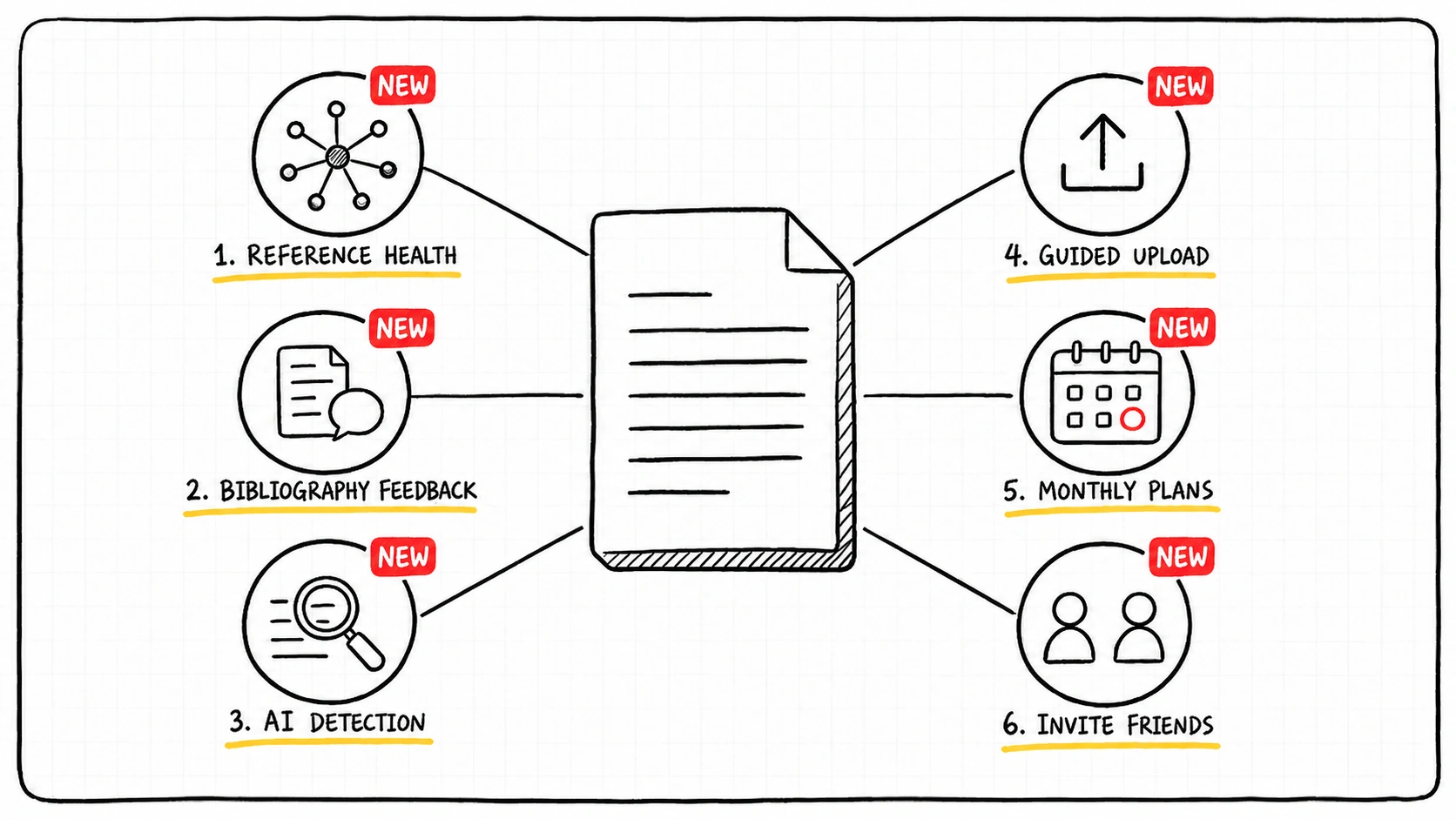 Three months of updates since PaperCheck 3.0
Since PaperCheck 3.0 in April we have kept shipping across the whole product: new tools inside your analysis, a simpler way to start one, monthly plans, credits that are easier to follow, a referral program, and a couple of extras beyond the analysis itself.
Here is everything that is new, grouped by where you will run into it.
Quick summary
In your analysis
- Reference Health: a dedicated workspace for your bibliography, with an interactive citation graph
- Fix Issues: every flagged reference comes with a corrected citation you can copy, as text or BibTeX
- Expertise Summary: a written overview of the literature your paper stands on
- Bibliography feedback on the page: what Reference Health found now shows up in Page Feedback too
- AI detection: built into the plagiarism report, with a signal breakdown and a PDF export
Starting an analysis
- Guided upload: a step-by-step flow that saves your progress and recovers if something fails
Plans and payment
- Monthly plans: subscribe for credits every month instead of buying one analysis at a time
- Clearer credits: see your balance, what a run will cost, and where your credits went
- Referral program: invite a friend, you both get credits
Beyond the analysis
- Credit calculator: work out what your paper will cost before you commit
- Toolbox: guides and vetted tools for the last weeks before submission, in your sidebar
In your analysis
Reference Health
Reference Health is now its own section in the sidebar, and it runs with every new analysis. It takes the references PaperCheck extracted from your paper, resolves each one against trusted academic sources, and tells you exactly where you stand.
Every reference lands in one of four plain-language states, so you always know what the next action is:
- Verified: the source exists, the link works, and it matches what you cited
- Needs correction: the title, year or authors do not match the source, or the citation is missing information
- Broken link: the source exists, but the link you cited does not resolve
- Not found: we could not locate the source in any database or on the web
The four states are used everywhere, on the stat cards, the filter chips, the graph and the checklist, so the number you see in one place is the number you see in the others.
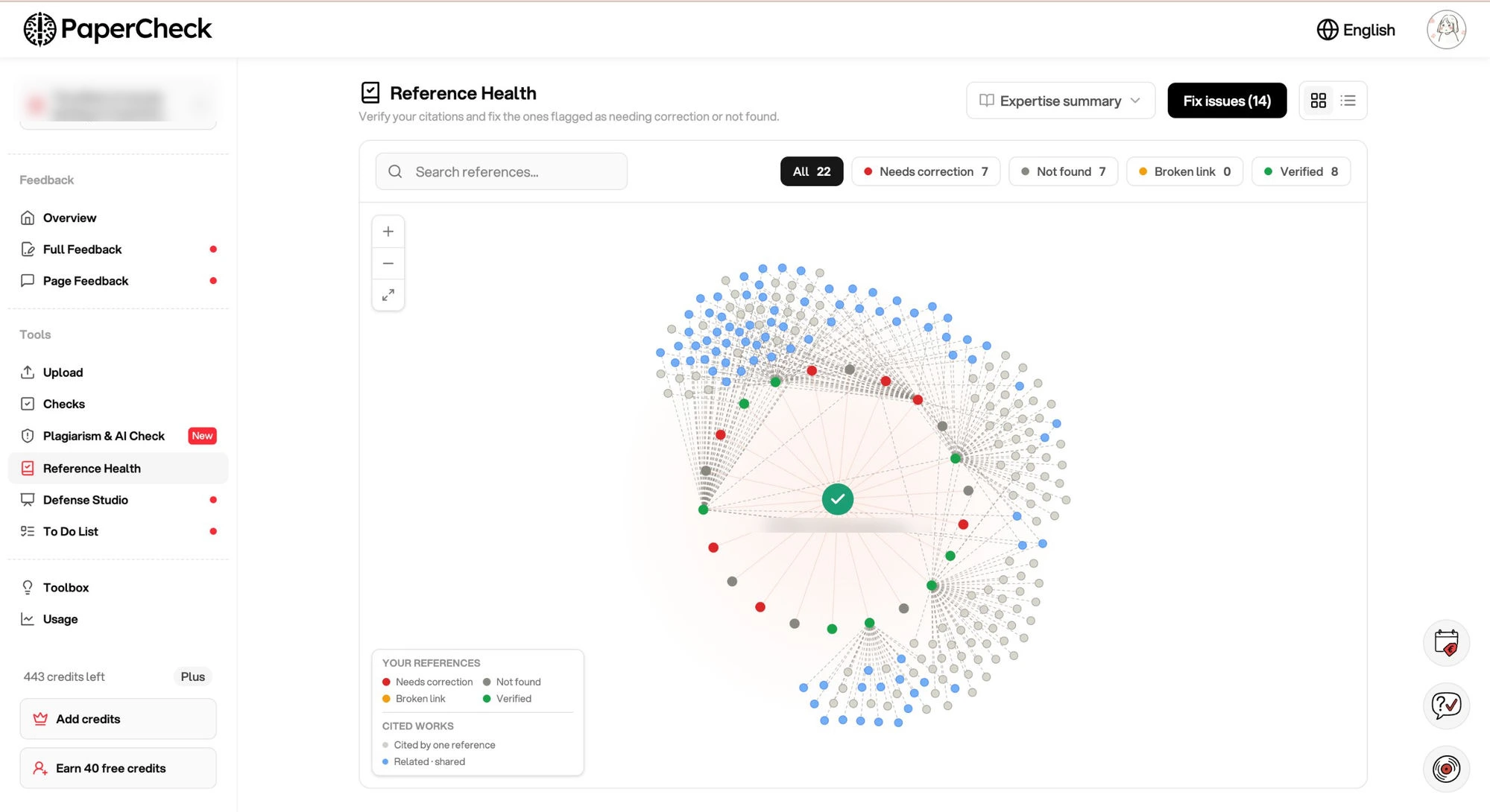 Every reference in your bibliography, colour-coded by status
The default view is a live graph. Your thesis sits at the centre and every reference orbits around it, coloured by status. Hover over a node to see the title, or click it for the full details. You can move the graph, zoom in, and filter it by status.
The graph also shows what your own sources cite, on dashed lines running outward. If two of your sources cite the same work, that work appears once, with a line to each of them. This is often the quickest way to find the key paper in your field that you have not read yet.
Below the graph is the Expertise Summary: a short written overview of the literature your paper is built on. It opens with the key takeaways and has a small table of contents, and every cited work links straight to its source, so you can trace a claim back to the paper behind it.
Finding a broken citation is only half the work, so the Fix Issues panel handles the other half. It shows your original reference exactly as you wrote it, the source we compared it against, and a list of what is wrong. Then it gives you a corrected version. Copy it as plain text for Word, or as BibTeX for LaTeX and reference managers, instead of retyping the citation field by field.
It also catches problems that are easy to miss on your own, such as two references that got fused into one entry during formatting, and citation style deviations where one entry does not follow the style the rest of your bibliography uses.
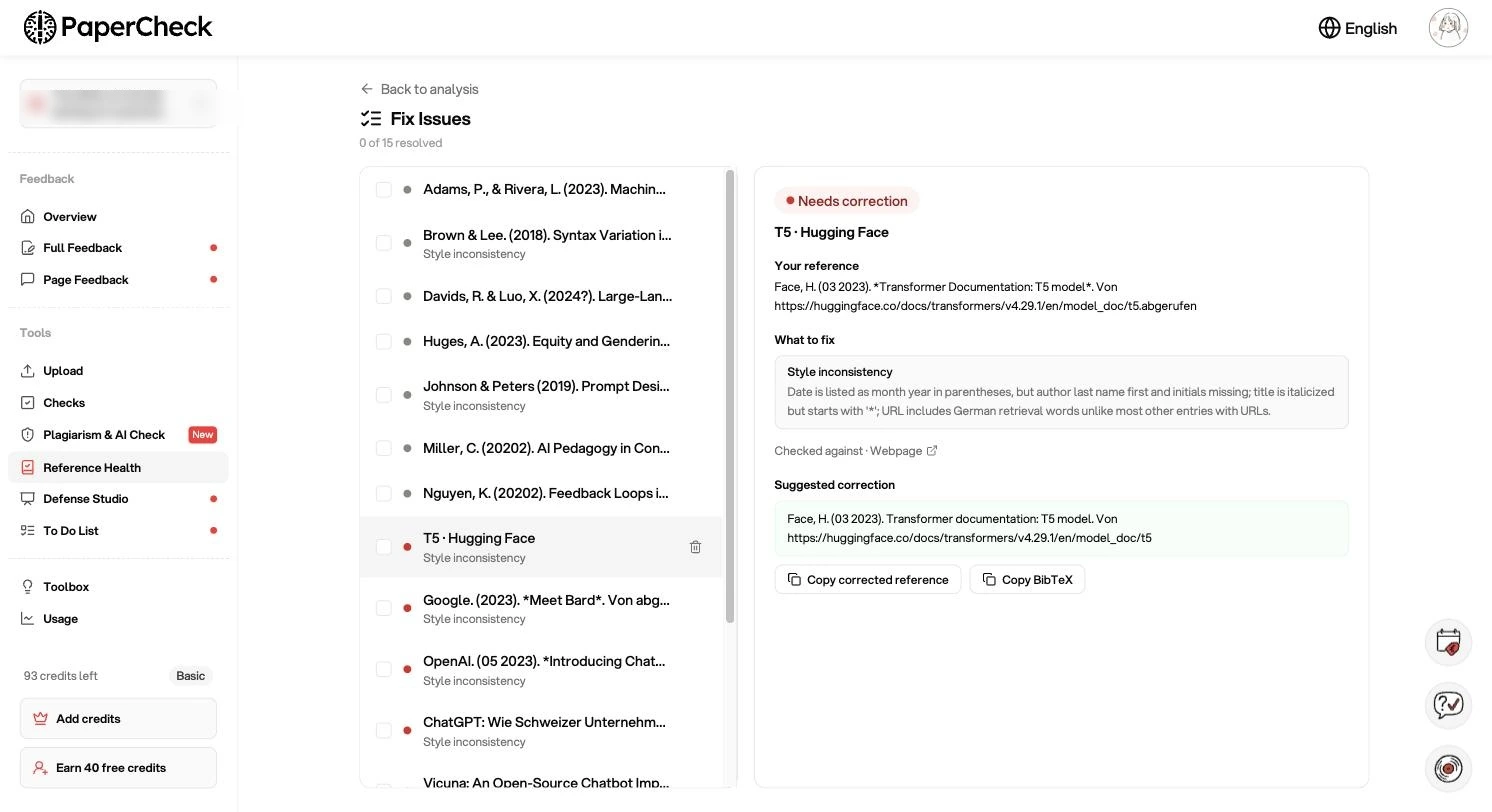 See what is wrong, then copy the corrected citation
Bibliography feedback, right on the page
This is our most recent release. Page Feedback already flagged reference problems in your text. It now carries what Reference Health found in your bibliography as well, as its own card type sitting alongside grammar, consistency and the rest, with its own filter.
Each card names the entry, says what is wrong with it, and ties back to the page it belongs to. Click one and the viewer scrolls to it and highlights it in your actual PDF. Entries that sit in your bibliography but are never cited anywhere in the text are folded into the same view, so you can clean up your reference list without cross-checking it by hand.
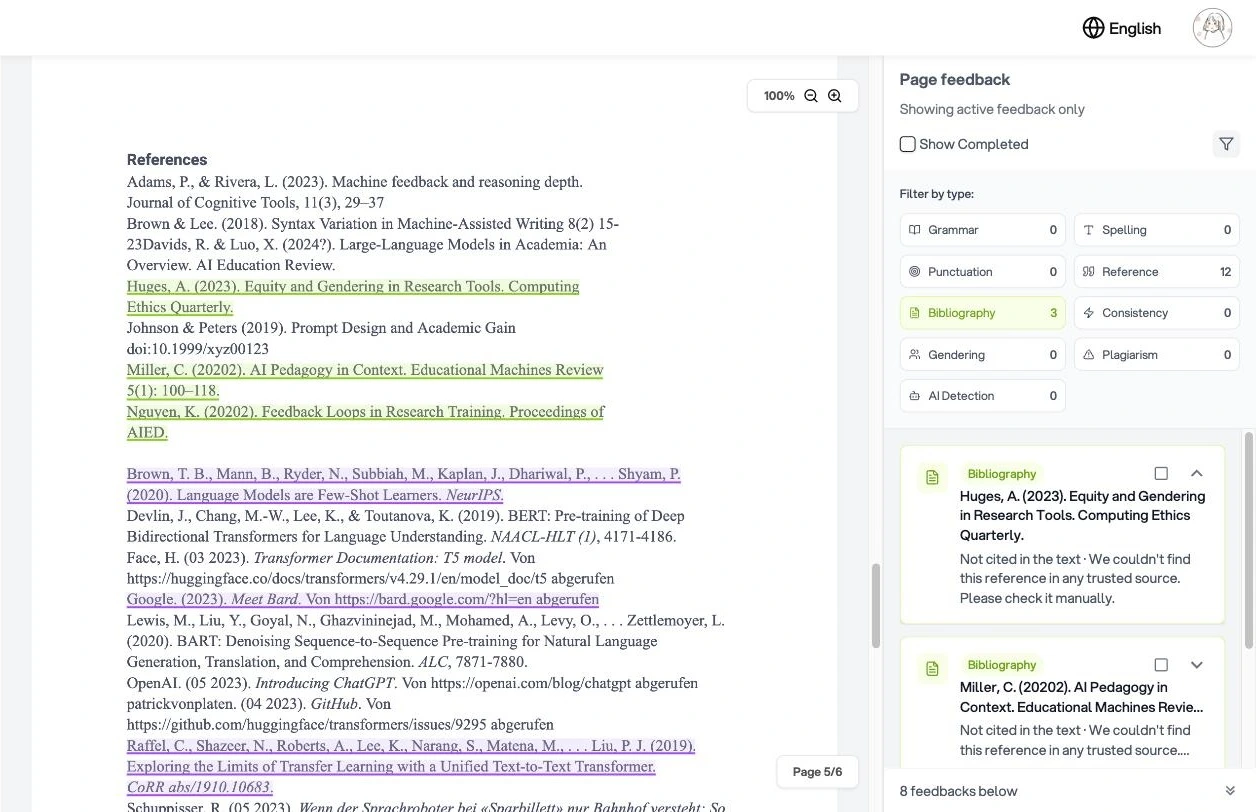 What Reference Health found, filtered alongside the rest of your page feedback
AI detection in the plagiarism report
AI detection is now part of the plagiarism report rather than a separate check, and it runs on English papers. You get an overall percentage, a signal breakdown splitting your text into highly likely AI, likely AI and human-written, with the word count behind each, and a list of every flagged passage with the page it sits on.
The whole report downloads as a PDF, which is what most students actually need when a supervisor asks for proof. If a detection run fails you can retry it from the same page. And when your paper comes back clean, you get a clear "no AI signal detected" banner instead of an empty results list.
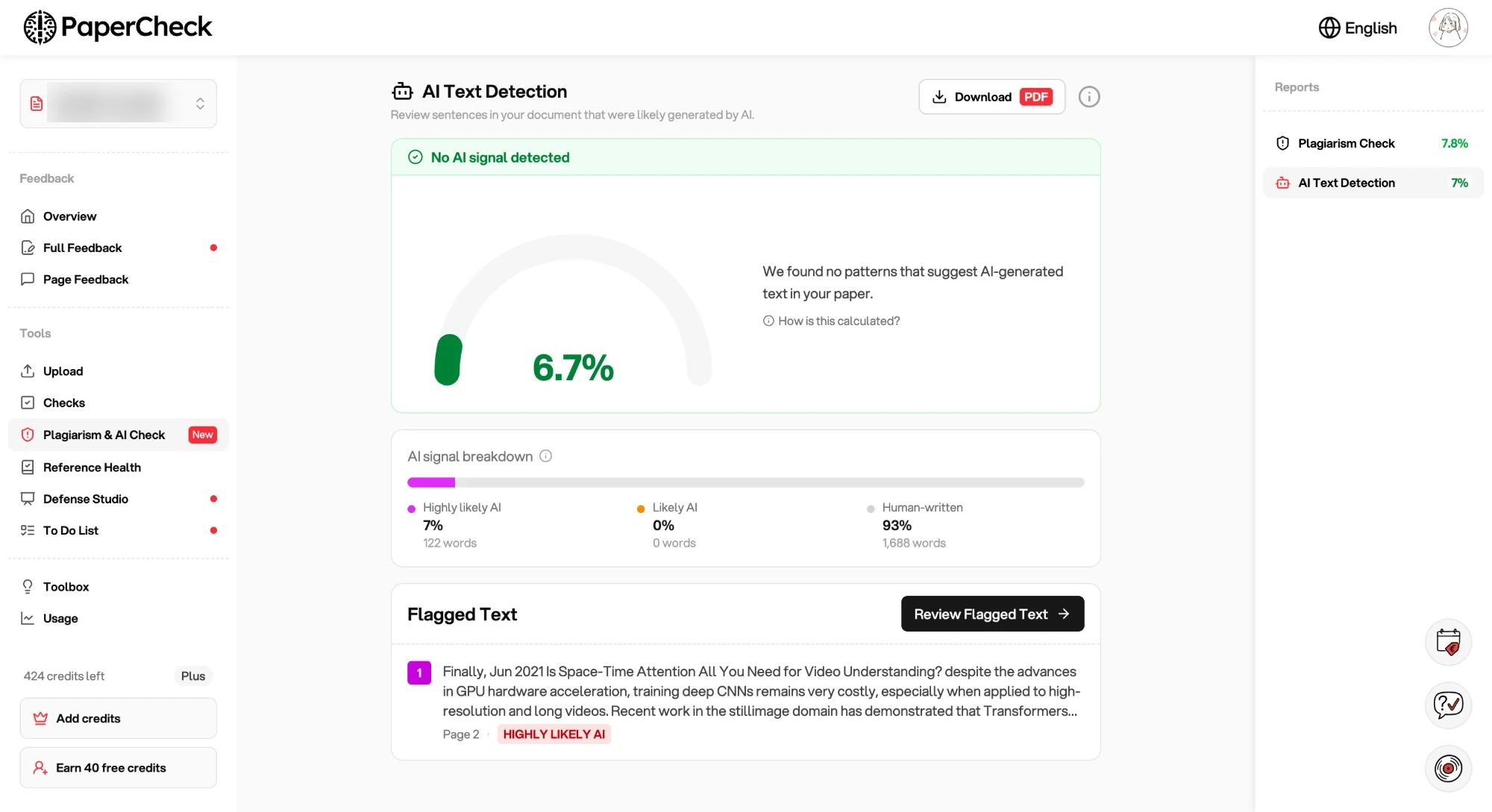 AI detection and plagiarism results in one report
Starting an analysis
A guided upload flow
Starting an analysis used to be one long form. It is now three clear steps: upload your document, choose what gets checked, then run the analysis.
The middle step is where the work happens. All nine standard checks are on by default, each with a line explaining what it actually does, so you can switch off the ones you do not need instead of guessing from the name. Below them you can add your own requirements. The cost updates as you go, based on your real page count.
Your progress is saved as you move through it, so closing the tab does not cost you the work. And if an analysis fails to start, a recovery card lets you resume it rather than beginning again.
Word documents are fully supported again, so there is no PDF conversion step.
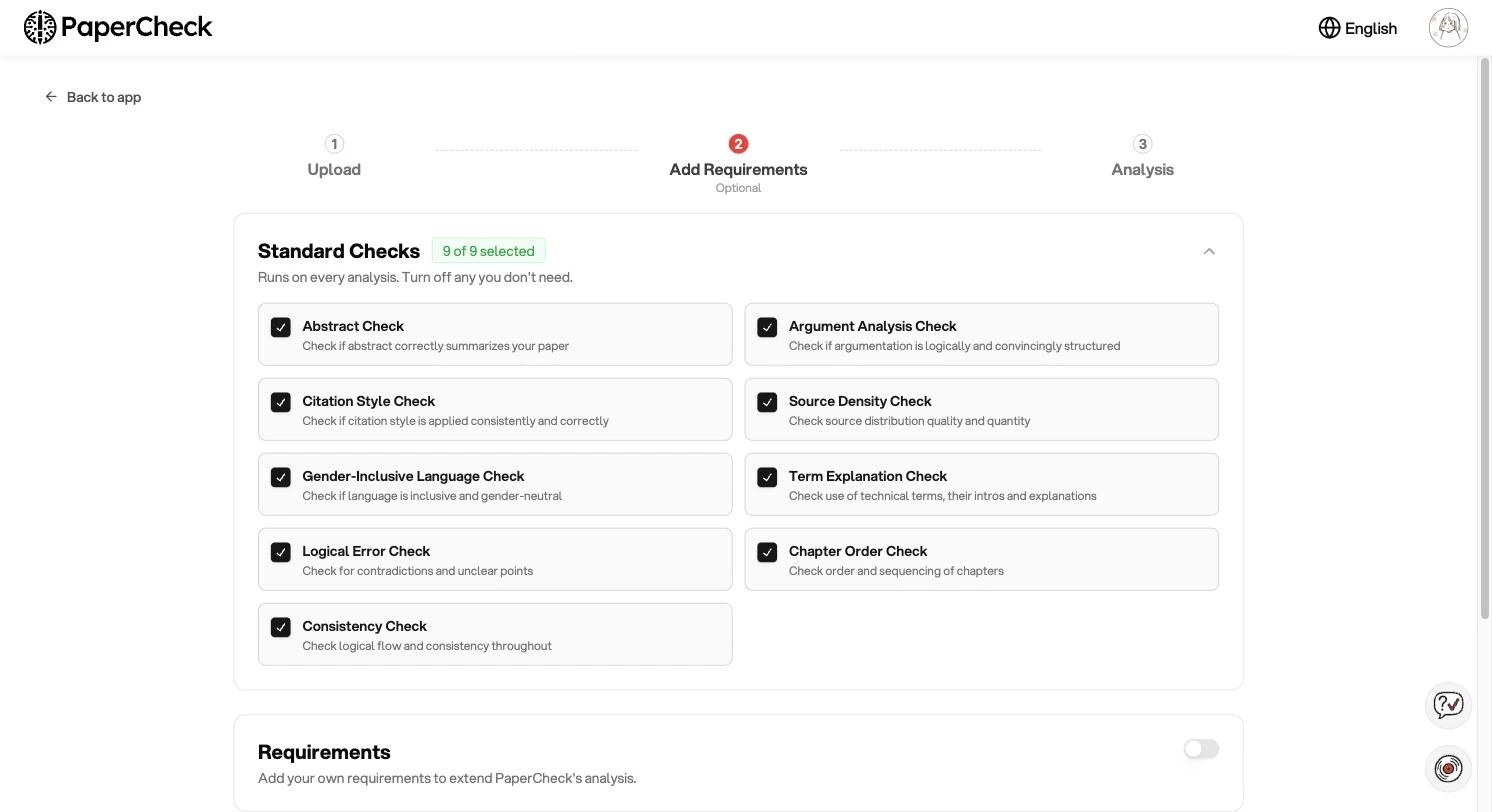 Upload, choose your checks, analyse
Plans and payment
Monthly plans
PaperCheck used to be one-time purchases only. You can now subscribe instead, and get a fresh batch of credits every month.
A toggle at the top of the pricing page switches between One-Time and Monthly, so you can compare the two before you decide. Every tier is available either way, and the monthly plans carry the same features as their one-time equivalents.
Upgrading mid-cycle shows a prorated confirmation before anything is charged, and you can manage or cancel the subscription yourself through the Stripe billing portal, linked from your account menu.
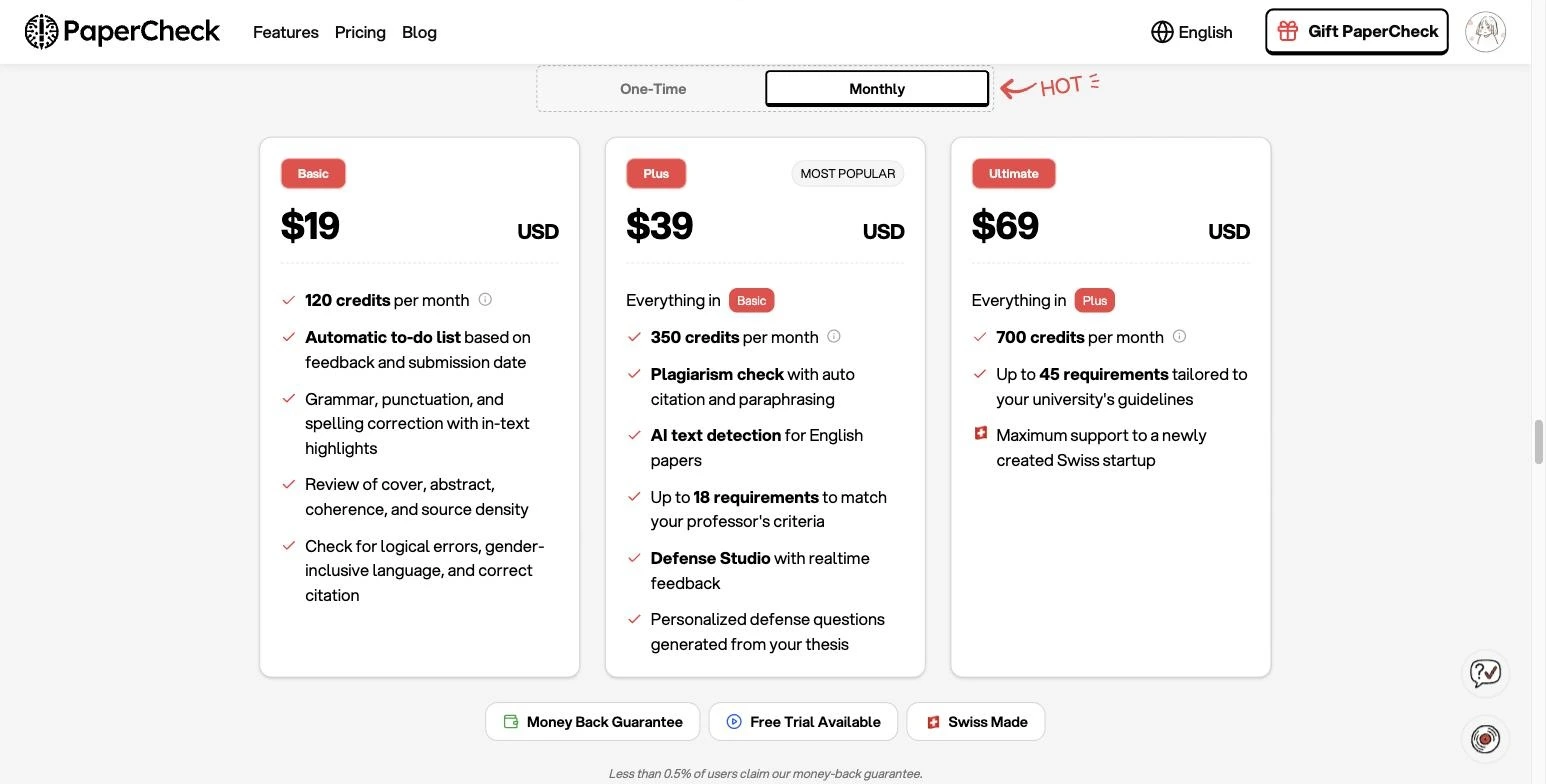 Switch between one-time and monthly on the pricing page
Credits you can actually see
Credits raised more questions than anything else, so we made them easier to see.
The credit balance in the sidebar now opens a breakdown showing what you hold at each tier, with a link straight to your usage history. Before you start a run, the cost is shown next to your remaining balance, and if you are short we tell you by how much instead of failing at the last step.
Plan cards explain what a credit is and what a typical paper costs. Subscribers can buy one-time credit top-up packs without changing plans. Your account page lists every invoice for download, and recent credit additions show up in your history so you can see where a balance came from.
Invite a friend, earn credits
PaperCheck now has a referral program, and both sides get something out of it. Your friend gets 20 free credits the moment they sign up through your link. You earn 10 credits when they upload a paper, and 40 when they buy a plan.
One limit worth knowing before you share your link: until you have bought something yourself, your referral earnings stop at 5 credits in total. Any purchase lifts that cap, and the full amounts apply from then on.
The app writes the invite message for you, so you can copy a ready-made note with your link already in it, or just copy the link on its own. Rewards land straight in your credit balance, nothing to claim.
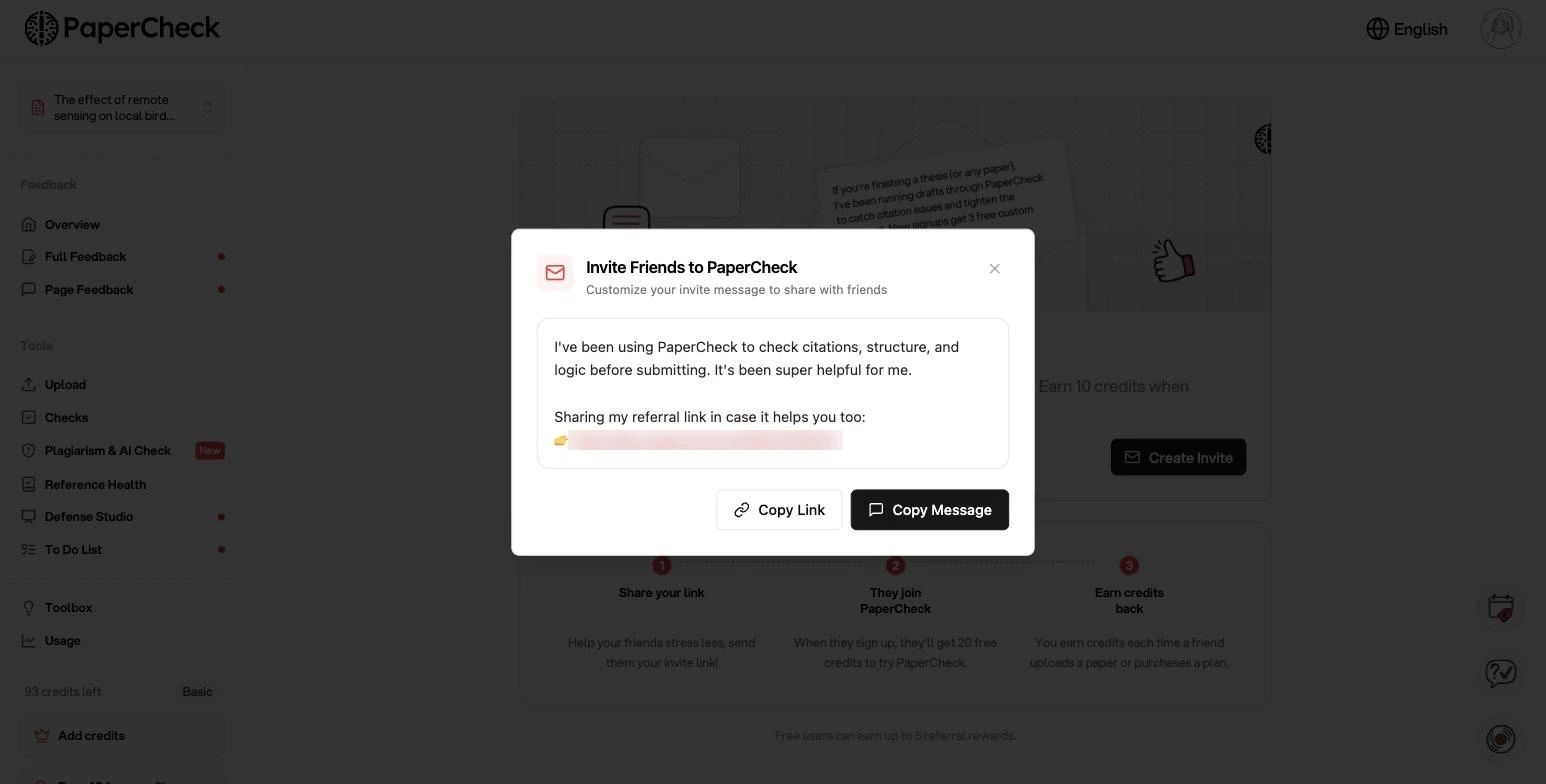 Share your link, you both get credits
Beyond the analysis
Check the cost first
Not sure what your thesis will cost before you commit? The credit calculator takes your word count, how long you have, and the checks you want, then suggests the plan that fits.
The Toolbox
You will find Toolbox in your sidebar: practical guides for the last weeks before submission, plus a short list of software worth using. Each tool carries an honest price tag, so you know what it costs before you click through.
More improvements
- Reference Health while you wait: the tab appears as soon as your analysis starts generating, so you can watch it fill in
- Version history: the paper version switcher is now a dropdown showing each version's status and timestamp, instead of a bare list
- Better grammar checks: upgraded to newer language models for proofreading and grammar
- Custom requirements: renamed from custom checks, shown in your analysis so you can see which ones ran
- Vouchers: discount codes now show the benefit clearly in your order summary before you pay
- Mobile: a floating menu for the plagiarism view and a responsive Reference Health layout
- Reports: exported PDFs now share one consistent layout across plagiarism, AI detection and feedback
- Reliability: faster analysis start, better handling of failed runs, and fixes to how credit coverage is calculated before a run begins
We also published two long reads you might like: The Paper That Was Published Before It Existed, on why fabricated citations are spreading, and How to Write Your Thesis Faster, a realistic time-management guide.
Frequently asked questions
Q: Do I need to re-run my analysis to get Reference Health? Reference Health runs as part of a new analysis. Older analyses from before it launched will not have it, and the tab will explain why.
Q: Is Reference Health included in my plan? Yes. It is part of a standard analysis, not a separate purchase.
Q: What if my references are in a style PaperCheck does not know? Reference Health does not enforce a specific style. It detects the dominant style in your own bibliography and flags entries that deviate from it, so it adapts to whatever your department requires.
Q: What happens if a source genuinely does not exist? It is marked as not found, which is exactly what you want to know before you submit. This is increasingly common with references produced by AI tools, and we wrote about why that matters.
Q: Does AI detection cost extra? No. It is part of the plagiarism report on Plus and Ultimate.
From Natthida, 20th July 2026