30 January 2026
What's New in PaperCheck - January 2026
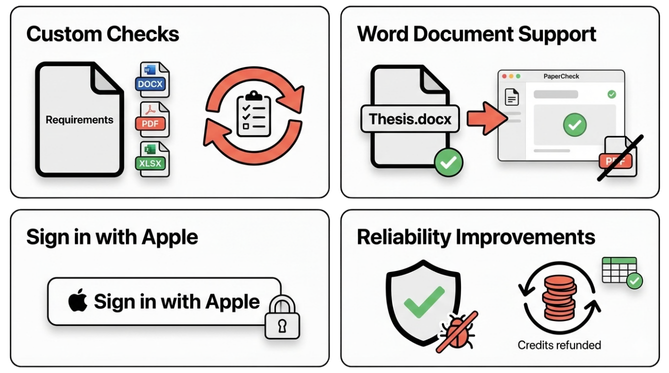
You can now upload your own requirements, submit Word documents without converting to PDF, and benefit from a faster, more stable PaperCheck.
Quick Summary
- Custom Checks: Upload your own requirements (Word/PDF/Excel) for tailored analysis.
- Direct Word Uploads: Submit
.docxfiles without converting to PDF. - Reliability: Faster analysis, table formatting fixes, and automatic refunds for errors.
Upload your own requirements
Upload requirement files (Word, PDF, or Excel) and PaperCheck will run them as custom checks. Reuse them across uploads so your paper meets your university or journal guidelines every time.
For example, upload your university's formatting guidelines or a document specifying:
- Citation style requirements (e.g., "Use APA 7th edition throughout")
- Word count limits for each section
- Specific terminology or style preferences
- Journal submission guidelines
PaperCheck will check your thesis against these requirements and flag any issues automatically.
Submit your thesis as Word, no PDF conversion needed
PaperCheck now fully supports Microsoft Word documents. You no longer need to convert your thesis to PDF before uploading. Simply submit your .docx file, and PaperCheck will analyze it directly.
Sign in with Apple
We’ve added Sign in with Apple as a secure, password-free login option. It’s a convenient way to access your account quickly while keeping your data private. Apple's "Hide My Email" feature is fully supported, allowing you to sign up without sharing your real email address.
Reliability Improvements
We’ve also released several updates to improve system stability and fix bugs:
Better Table Support
Feedback reports now correctly display and format tables, ensuring complex data structures in your thesis are reviewed accurately without layout issues.
Automatic Credit Refunds
If an analysis fails for any reason, your credits will be automatically refunded to your account immediately. You can try again without contacting support.
Smarter Upload Handling
We've improved how duplicate uploads are handled to prevent accidental credit usage and ensure you aren't charged twice for the same file.
Frequently Asked Questions
Q: Can I use Hide My Email with Sign in with Apple?
Yes! PaperCheck fully supports Apple's "Hide My Email" feature. You can sign up and receive all notifications through your private relay email address.
Q: What happens to my credits if an analysis fails?
If PaperCheck encounters an error during analysis, your credits are automatically refunded to your account. No action needed on your part.
Q: Can I upload multiple requirement files?
Yes, you can upload up to 6 custom requirement documents. PaperCheck will check your thesis against all of them and consolidate the feedback in one report.
Ready to try?
Upload your paper and see the difference with our new custom checks.
By Jordan, 30th January 2026